Welcome
ULTRASYNTH3 is a three-oscillator hybrid synthesizer that lives on your Kurzweil K2700. You design a sound on one page: three oscillators, a mixer, a filter, three envelopes, three LFOs, a 16-row mod matrix and effects. Every patch is turned into a real K2700 program, a stack of VAST layers with its own effect chain, so the sound you make plays on the instrument itself.
The app also plays every patch on its own, so you can design without a K2700. When one is connected by USB, each move you make reaches it as you make it, and a finished sound is stored on it with one button.
- One page. Nothing hidden in sub-menus: the VOICE page holds the sound, the MOD MATRIX · FX page the routing and the effects.
- Honest about the instrument. The panel shows what each sound costs on the K2700 (layers, notes) and greys out what the K2700 cannot do, with the reason under the mouse.
- 128 starters, MODERN 1 and MODERN 2, in 8 categories each, and 128 places of your own.
Getting started
What you need
- A Mac with macOS 12 or later.
- To play the sounds on the instrument: a Kurzweil K2700 and a USB cable to its USB COMPUTER port (MIDI and audio travel on the same cable).
First sounds
- Open ULTRASYNTH3. It starts on A11 Glass Stack, a starter.
- Play the keyboard at the bottom of the window with the mouse, or play any MIDI keyboard connected to the Mac: the app listens to every MIDI input.
- Step through the starters with ◄ ► next to the patch name, or open BROWSE… to see them all.
- Turn a knob: drag up or down. Hold Shift for fine steps; double-click a knob to return it to its default.
To use the K2700, see Working with the K2700.
The panel at a glance
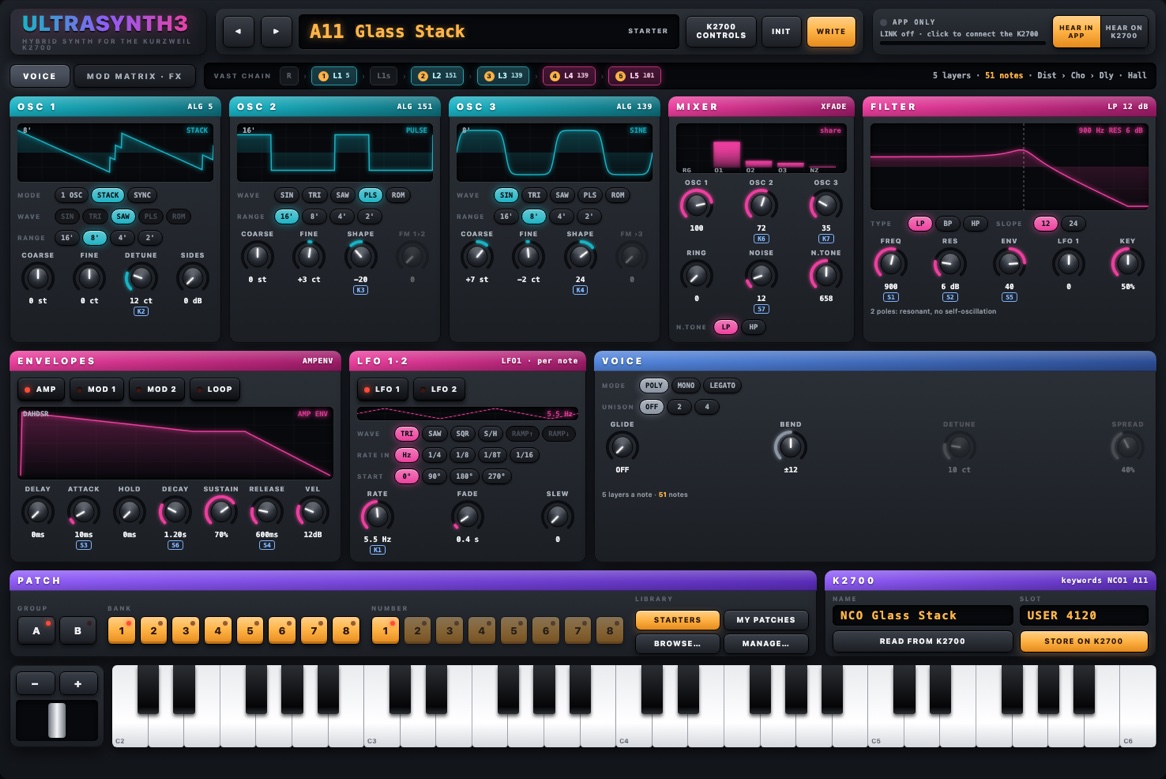
| Area | What it holds |
|---|---|
| Top bar | ◄ ► and the patch's place and name; K2700 CONTROLS shows or hides the small tags that tell which K2700 slider or knob moves a control; INIT starts a plain patch; WRITE saves the patch into MY PATCHES; the LINK box; HEAR IN APP / HEAR ON K2700. |
| Tabs | VOICE (oscillators, mixer, filter, envelopes, LFOs, voice) and MOD MATRIX · FX (the matrix, LFO 3, the K2700 resources and the effects). |
| VAST CHAIN | The layers this patch becomes on the K2700, in order. A lit chip is a layer in use, with its wiring (ALG) and, in a round badge, the layer's number on the K2700. On the right: the layers a note takes, how many notes the K2700 can play at once, and the effects. |
| Modules | Colour tells the family: teal the oscillators, magenta the analog part (mixer, filter, envelopes, LFOs), blue the voice, grey the routing and effects, purple the K2700. |
| PATCH and K2700 | The library (see Patches and the library) and the K2700 box (name, place, READ, STORE). |
| Keyboard | − / + shift the keys by octaves; the strip on the left is a pitch bender that springs back. |
Hover any control to read what it does. A greyed-out control says why it is not available in this patch.
Oscillators
Three oscillators, each with a display of its wave. On the K2700 each one is a layer of the chain.
| Control | Range | What it does |
|---|---|---|
| MODE (OSC 1) | 1 OSC, STACK, SYNC | STACK is three detuned saws in one oscillator; SYNC a hard-synced saw or pulse (the pulse takes a second layer for its slave). |
| WAVE | SIN, TRI, SAW, PLS, ROM | ROM opens a list of the K2700's own waveforms. ROM waves are samples: they sound on the K2700 only (HEAR ON K2700), not in the app. |
| RANGE | 16', 8', 4', 2' | The octave. |
| COARSE | −24 … +24 semitones | |
| FINE | −50 … +50 cents | |
| DETUNE (STACK) | 0 … 50 cents | The spread of the three saws. |
| SIDES (STACK) | 0, 6, 12, 18 dB | How much quieter the two outer saws are. |
| SYNC (SYNC) | 0 … 64 semitones | The synced oscillator's offset: the classic sync sweep. |
| SHAPE | −64 … +63 | PULSE: the width; SAW: a shaped saw; SINE and TRI: a waveshaper; ROM: a lowpass. |
| FM 1›2 (OSC 2) | 0 … 127 | OSC 2 becomes an FM operator modulated by OSC 1. |
| FM ›3 (OSC 3) | 0 … 127 | OSC 3 becomes an FM operator modulated by the mix so far. |
Mixer
The display shows each source's share of the mix.
| Control | Range | What it does |
|---|---|---|
| OSC 1, OSC 2, OSC 3 | 0 … 127 | Each oscillator's level. An oscillator at 0 is left out of the chain (fewer layers, more notes). |
| RING | 0 … 127 | OSC 1 × OSC 2, a ring-modulation layer at the head of the chain. It sets OSC 1 to 1 OSC. |
| NOISE | 0 … 127 | White noise into the mix. |
| N.TONE | 20 Hz … 20 kHz, LP or HP | A tone filter on the noise only. |
Filter
The display draws the filter's response; the dashed line is the cutoff.
| Control | Range | What it does |
|---|---|---|
| TYPE | LP, BP, HP | Lowpass, bandpass, highpass. |
| SLOPE | 12, 24 dB | 12 dB: 2 poles, resonant, no self-oscillation. BP 12: RES sets the width. BP 24: a highpass and a lowpass at the same frequency. |
| FREQ | 16 Hz … about 20 kHz | The cutoff. |
| RES | 0 … 30 dB | The resonance. |
| ENV | −64 … +63 | MOD ENV 1 to the cutoff, 100 cents a step. It is the same value as a matrix row MOD ENV 1 → FILTER FREQ: move one and the other follows. |
| LFO 1 | −64 … +63 | LFO 1 to the cutoff, the same way. |
| KEY | 0 … 100 % | How much the cutoff follows the keys. |
Envelopes
Three envelopes, chosen with the buttons on top: AMP (the volume), MOD 1 and MOD 2 (free for the matrix; MOD 1 also drives the filter's ENV). Each is a DAHDSR: delay, attack, hold, decay, sustain, release.
| Control | Range | What it does |
|---|---|---|
| DELAY, ATTACK, HOLD, DECAY, RELEASE | 0 … 60 s | The stages' times. |
| SUSTAIN | 0 … 100 % | The level held while the key is down. |
| VEL | AMP: 0 … 48 dB; MOD: 0 … 100 % | How much velocity scales the envelope. |
| LOOP | on / off | The envelope repeats from its attack while the key is held. |
LFOs
LFO 1 runs per note; LFO 2 is a second one for the matrix; LFO 3 (on the MOD MATRIX · FX page) is a global, free-running LFO shared by every note.
| Control | Range | What it does |
|---|---|---|
| WAVE | TRI, SAW, SQR, S/H, RAMP↑, RAMP↓ | The shape. S/H is a random step. |
| RATE IN | Hz, 1/4, 1/8, 1/8T, 1/16 | Free in Hz, or locked to the tempo. |
| START | 0°, 90°, 180°, 270° | Where the wave starts on each note. |
| RATE | 0 … 24 Hz | |
| FADE | 0 … 10 s | The LFO fades in after the note starts. |
| SLEW | 0 … 127 | Smooths the wave's edges. |
Globals. Using LFO 3 in the matrix switches the program's Globals on. Then LFO 2 runs on the K2700 as a repeating envelope: TRI and the two ramps only, in Hz, without START, FADE or SLEW. The MOD MATRIX counter shows whether Globals are on.
Voice
| Control | Range | What it does |
|---|---|---|
| MODE | POLY, MONO, LEGATO | MONO plays one note at a time; LEGATO also does not restart the envelopes between overlapping notes. |
| UNISON | OFF, 2, 4 | The whole chain played 2 or 4 times, detuned and spread. |
| GLIDE | OFF … 127 | Portamento. |
| BEND | ±0 … ±24 semitones | The pitch wheel's range. |
| DETUNE (UNISON) | 0 … 50 cents | |
| SPREAD (UNISON) | 0 … 100 % | The copies' stereo spread. |
Under the knobs: the layers a note takes and how many notes the K2700 can play at once. The K2700 has 256 layer voices, so a 5-layer patch plays 51 notes; with UNISON 4 it plays 12. Under 8 notes is shown in red.
Mod matrix
Sixteen rows, each SOURCE × SOURCE 2 → DEPTH → DESTINATION. SOURCE 2 is optional: it scales the first source (for example LFO 1 × MOD WHEEL for a vibrato on the wheel). Drag a DEPTH bar sideways (Shift for fine steps, double-click for 0); it runs −64 … +63.
| Sources | Destinations |
|---|---|
| LFO 1, LFO 2, LFO 3, AMP ENV, MOD ENV 1, MOD ENV 2, VELOCITY, KEYBOARD, MOD WHEEL, AFTERTOUCH, PITCH BEND, EXPRESSION, FOOT, BREATH, RIBBON, SUSTAIN, RANDOM | OSC 1 / 2 / 3 PITCH, OSC 1·2·3 PITCH, OSC 1 / 2 / 3 SHAPE, OSC 1 DETUNE, OSC 1 SYNC, OSC 2 FM, OSC 3 FM, OSC 2 LEVEL, OSC 3 LEVEL, NOISE LEVEL, RING LEVEL, FILTER FREQ, FILTER RES, AMP LEVEL, LFO 1 RATE, LFO 3 RATE, ENV ATTACK, ENV DECAY, ENV RELEASE |
The K2700 ROUTE column shows where each row lands on the instrument. A row in red has found no free place on the K2700 for it (every modulation slot of that layer is taken): change it, or free another row. The counter above the table shows the rows in use, the function generators in use and whether Globals are on.
K2700 RESOURCES, next to the matrix, lists the envelopes, LFOs and functions this patch takes on the K2700 and what each one does.
Effects
On the K2700 every patch uses one effect chain in its insert, DIST → MOD → DELAY, plus a hall reverb on an aux send. Every effect knob moves live, in the app and on the K2700.
| Module | Controls | What it does |
|---|---|---|
| DIST | WET 0 … 100 % | Distortion before the modulation. |
| MOD | CHORUS, FLANGE or PHASE; RATE; DEPTH 0 … 20 cents; MIX −96 … 0 dB | One of the three at a time. MIX is its level next to the dry sound (−96 dB is off). |
| DELAY | 1/4, 1/8, 1/8D, 1/16; FDBK 0 … 90 %; LEVEL −96 … 0 dB | A tempo delay; LEVEL next to the dry sound, on its own. |
| REVERB | TIME 0.5 … 10 s; SEND 0 … 100 % | The hall. |
The delay, and an LFO locked to the tempo, follow the K2700's tempo (its TEMPO page) when the patch plays there.
Patches and the library
Places
A patch has a place: GROUP (A, B), BANK (1 … 8) and NUMBER (1 … 8), so A11 … B88. STARTERS holds the 128 starters, MODERN 1 in group A and MODERN 2 in group B; MY PATCHES holds 128 places of your own. An empty place shows a dim number.
Saving
WRITE saves the patch into MY PATCHES: choose a place and a name (12 characters). Editing a patch marks it EDITED until it is written. INIT starts from a plain saw through an open filter.
The preset browser
BROWSE… opens every patch as a card: its place, name, category and a description. Search names, categories and descriptions; show ALL, STARTERS or MY PATCHES; pick a category on the left. Click a card to open the patch: the browser stays open so you can play it; ▶ opens it and plays a C. Keys: arrows to move, Enter to open and close, Space to play, Esc to close.
Managing your patches
MANAGE… renames or deletes the patch at the current place, exports all your patches as one bank file, and
imports a bank or patch file placed in the app's import folder (~/Documents/MEGASYNTH3/import; exports go
to ~/Documents/MEGASYNTH3/exports). It asks before replacing a patch of yours.
Working with the K2700
Connecting (LINK)
- Connect the K2700's USB COMPUTER port to the Mac and switch the K2700 on, in Program mode.
- Click the LINK box (top right), choose the K2700's port and a MIDI channel (1 by default), and CONNECT. The box shows K2700 LINKED, the port, the channel and the K2700's version.
- On the K2700, select the same MIDI channel.
From then on the patch plays in the K2700's edit buffer and every change is sent as you make it. Nothing is stored on the K2700 until you press STORE.
The effect chain. The first time, the app finds that the K2700 does not have its effect chain and asks to write it (only the chain; no program is changed). Say WRITE: without it the K2700 plays your sounds without their effects.
Hearing
HEAR IN APP plays the app's own sound; HEAR ON K2700 mutes the app so you hear the instrument. The app's sound is a preview of the patch; the K2700 is the instrument, and some sounds (ROM waves above all) are heard on it only.
Storing and reading
STORE ON K2700 writes the patch as a program into a USER place (4096 … 8191), named "NCO" and the patch's name, with the effect chain it uses. It asks before replacing anything and reads the program back to check it. READ FROM K2700 opens a stored program (any ID 1 … 8191) as a patch. A program that was changed on the K2700 in ways the app does not write opens as the nearest patch, with a list of what it leaves out.
Good to know
- While the LINK is playing a patch, the K2700's display keeps the name of the program selected on it; STORE gives your sound its own name.
- Saving the LINK's sound from the K2700's own panel needs a value changed in Edit first; STORE ON K2700 is the simple way.
- The VAST CHAIN badges give each layer's number on the K2700, to find it in the K2700's own editor.
The K2700's sliders and knobs
Each program carries a control plan, so the K2700's own panel plays it. K2700 CONTROLS shows these tags on the app's knobs.
| K2700 | Moves | K2700 | Moves |
|---|---|---|---|
| Slider 1 | Filter FREQ | Knob 1 | LFO 1 RATE |
| Slider 2 | Filter RES | Knob 2 | OSC 1 DETUNE |
| Slider 3 | AMP ATTACK | Knob 3 | OSC 2 SHAPE |
| Slider 4 | AMP RELEASE | Knob 4 | OSC 3 SHAPE |
| Slider 5 | Filter ENV | Knob 5 | LFO 3 RATE |
| Slider 6 | AMP DECAY | Knob 6 | OSC 2 level |
| Slider 7 | NOISE | Knob 7 | OSC 3 level |
| Slider 8 | DIST WET | Knob 9 | REVERB TIME |
| Slider 9 | REVERB SEND | Button 9 | Reverb on / off |
The mod wheel brings in the vibrato of the starters that use it (a matrix row LFO 1 × MOD WHEEL).
The starters
128 sounds in two groups of 64: group A is MODERN 1, group B is MODERN 2. In each group one category per bank, every sound levelled to the same loudness:
| Bank | Category | Bank | Category |
|---|---|---|---|
| A1 · B1 | POLY | A5 · B5 | KEYS & PLUCK |
| A2 · B2 | BASS | A6 · B6 | BRASS & STRINGS |
| A3 · B3 | LEAD | A7 · B7 | MOTION |
| A4 · B4 | PAD | A8 · B8 | FX & PERC |
Choose the group with GROUP A or B. All of them can be heard on the Sound Library's pages: MODERN 1 and MODERN 2. A starter cannot be overwritten: WRITE it into MY PATCHES to keep your changes.
Troubleshooting
| Symptom | Check |
|---|---|
| The LINK does not connect | The USB cable in the K2700's USB COMPUTER port; the K2700 on and in Program mode; the right port in the LINK box. |
| The K2700 plays another sound | The K2700's selected MIDI channel must be the LINK's channel. |
| No effects on the K2700 | Its effect chain is missing: connect the LINK again and say WRITE, or STORE the patch once. |
| The delay or a tempo LFO runs at the wrong speed | They follow the K2700's tempo: set it on its TEMPO page. |
| The K2700's display shows another name | Normal while the LINK plays the edit buffer; STORE names the program. |
| A control is grey | Hover it: the reason is shown (for example, SHAPE is not available on a STACK). |
| A matrix row is red | No free K2700 slot for it on that layer: free another row or change the destination. |
| Few notes of polyphony | Each oscillator, the noise, RING and UNISON add layers: leave out what the sound does not need. |
| A ROM wave is silent | ROM waves sound on the K2700 only: HEAR ON K2700. |