Welcome
CINEMATIK is a sound stage for the Kurzweil K2700: a synthesizer made for long pads, drones, textures and trailer moments. Each of its three reels plays one of the synth's own oscillators or any keymap your K2700 holds, the factory's or your own, and every patch becomes a real K2700 program, a stack of VAST layers with its own effects.
CINEMATIK makes no sound of its own. The keymaps live on your instrument, so what you hear is the K2700: the app sends every move to it over USB as you make it, stores finished sounds on it and reads them back.
- One page, a picture palace. A marquee for the title, three film reels, a screen that projects whatever you touch, a lens for the filter, a timeline for the envelopes, a typed cue sheet for the modulation.
- Any keymap. The factory keymaps on eleven shelves, and the USER keymaps a scan finds on your K2700.
- 128 scenes in two packs of 8 categories, levelled on the K2700: CINEMATIK PACK 1, dark and vast, and CINEMATIK PACK 2, calm and light. And 128 places of your own.
Getting started
What you need
- A Mac with macOS 12 or later.
- A Kurzweil K2700 and a USB cable to its USB COMPUTER port (MIDI and audio travel on the same cable). CINEMATIK needs it: without the K2700 there is no sound.
First sounds
- Connect the K2700, switch it on and put it in Program mode.
- Open CINEMATIK. It starts on A11 Titan Choir.
- Flip the switch in the booth (top right), choose the K2700's port and a MIDI channel (1 by default) and CONNECT. On the K2700, select the same channel. The booth shows K2700 LINKED.
- Play the keys at the bottom of the window with the mouse, play the K2700's own keyboard, or use the Mac's keyboard (see The keys).
- Step through the scenes with ◀ ▶ on the marquee, or click the title to open THE PROGRAMME.
- Turn a knob: drag up or down. Hold Shift for fine steps; double-click a knob to return it to its default.
Once a port has been chosen, CINEMATIK connects to the K2700 by itself every time it opens.
The panel at a glance
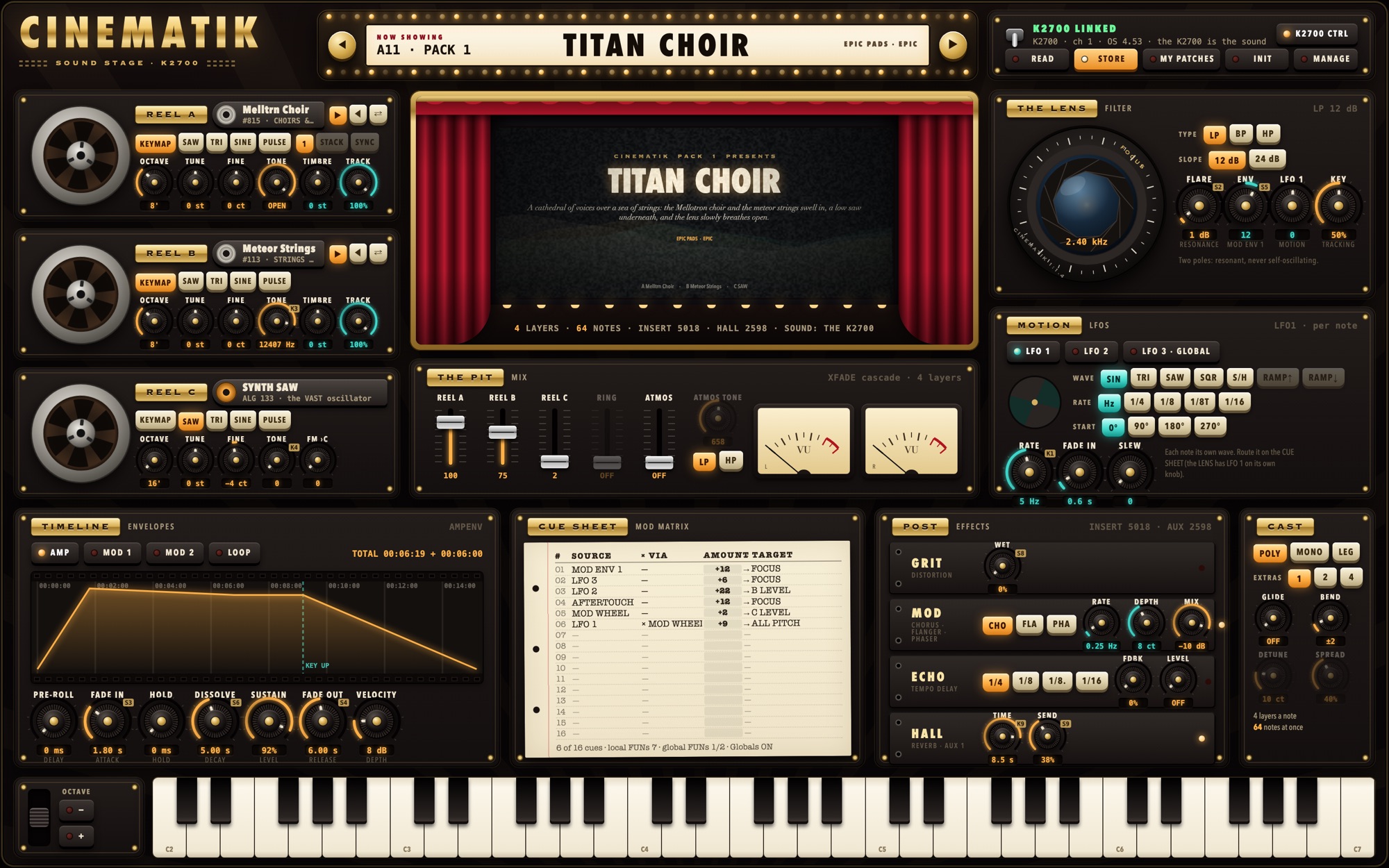
| Area | What it holds |
|---|---|
| Marquee | NOW SHOWING: the patch's place and pack (A11 · PACK 1, B11 · PACK 2, MINE for yours), its title, its category and genre, EDITED once you change it; ◀ ▶ step through the patches; a click on the title opens THE PROGRAMME. |
| Booth | The K2700: the LINK switch and its state; READ, STORE, MY PATCHES (write the patch there), INIT, MANAGE; K2700 CTRL shows or hides the small tags that tell which K2700 slider or knob moves a control. |
| REEL A, B, C | The three sources (see The reels). |
| The screen | The title card, or a close-up of what you touch (see The screen). |
| THE PIT | The mix (see The pit). |
| THE LENS | The filter. |
| MOTION | The three LFOs. |
| TIMELINE | The three envelopes. |
| CUE SHEET | The modulation matrix. |
| POST | The effects. |
| CAST | The voice: poly or mono, unison, glide, bend. |
| Keys | The bender on the left (it springs back), the octave buttons, five octaves of keys. |
Hover any control to read what it does. A greyed-out control says why it is not available in this patch. The colours follow the cinema's grade: amber for what sounds, teal for what moves it.
The reels
Each reel is a source of the sound and a layer of the program on the K2700. The reel turns while notes sound; a reel at 0 in THE PIT stands still and is left out of the program (fewer layers, more notes).
What a reel plays
The tabs under the reel's plaque choose its source: KEYMAP, or one of the synth's oscillators, SAW, TRI, SINE or PULSE. Reel A can also be STACK (three detuned saws) or SYNC (a hard-synced saw or pulse); 1 sets it back to a single oscillator. The film can next to the plaque shows what the reel plays; click it to open THE FILM VAULT and choose a keymap.
Controls
| Control | Range | What it does |
|---|---|---|
| OCTAVE | 16', 8', 4', 2' | The octave. |
| TUNE | −24 … +24 semitones | |
| FINE | −50 … +50 cents | |
| TONE | a keymap: open … 8 octaves down | A keymap reel's own lowpass: OPEN at the right, darker to the left. On an oscillator: PULSE the width, SAW a shaped saw, SINE and TRI a waveshaper. |
| ▶ ◀ ⇄ (keymaps) | forward, reverse, both ways | How the keymap's samples play: as they are, backwards (a one-shot becomes a swell), or forwards then backwards. |
| TIMBRE (keymaps) | −24 … +24 semitones | Timbre shift: the K2700 plays another of the keymap's roots at the same pitch. Up: a smaller, brighter instrument; down: a larger, darker one. |
| TRACK (keymaps) | 0 … 100 % | Key tracking. At 100 % the keys play in tune; at 0 % every key plays the same pitch, for drones and textures. |
| DETUNE, SIDES (STACK) | 0 … 50 cents; 0, 6, 12, 18 dB | The spread of the three saws, and how much quieter the outer two are. |
| SYNC (SYNC) | 0 … 64 semitones | The synced oscillator's offset. |
| FM A›B, FM ›C | 0 … 127 | Reel B as an FM operator modulated by reel A; reel C by the mix so far. Oscillators only (SAW, TRI, SINE). |
Good to know
- Keymaps differ: some are looped and hold as long as the key is down, others are one-shots that die away (a hit, a pluck). THE FILM VAULT says which. For a pad, let a looped keymap carry the sound and use a one-shot as its glint.
- Many keymaps are made for a range of the keyboard: played far below it they get quiet and slow.
- The synth's oscillators are much louder than most keymaps: a little of an oscillator goes a long way in THE PIT.
The film vault
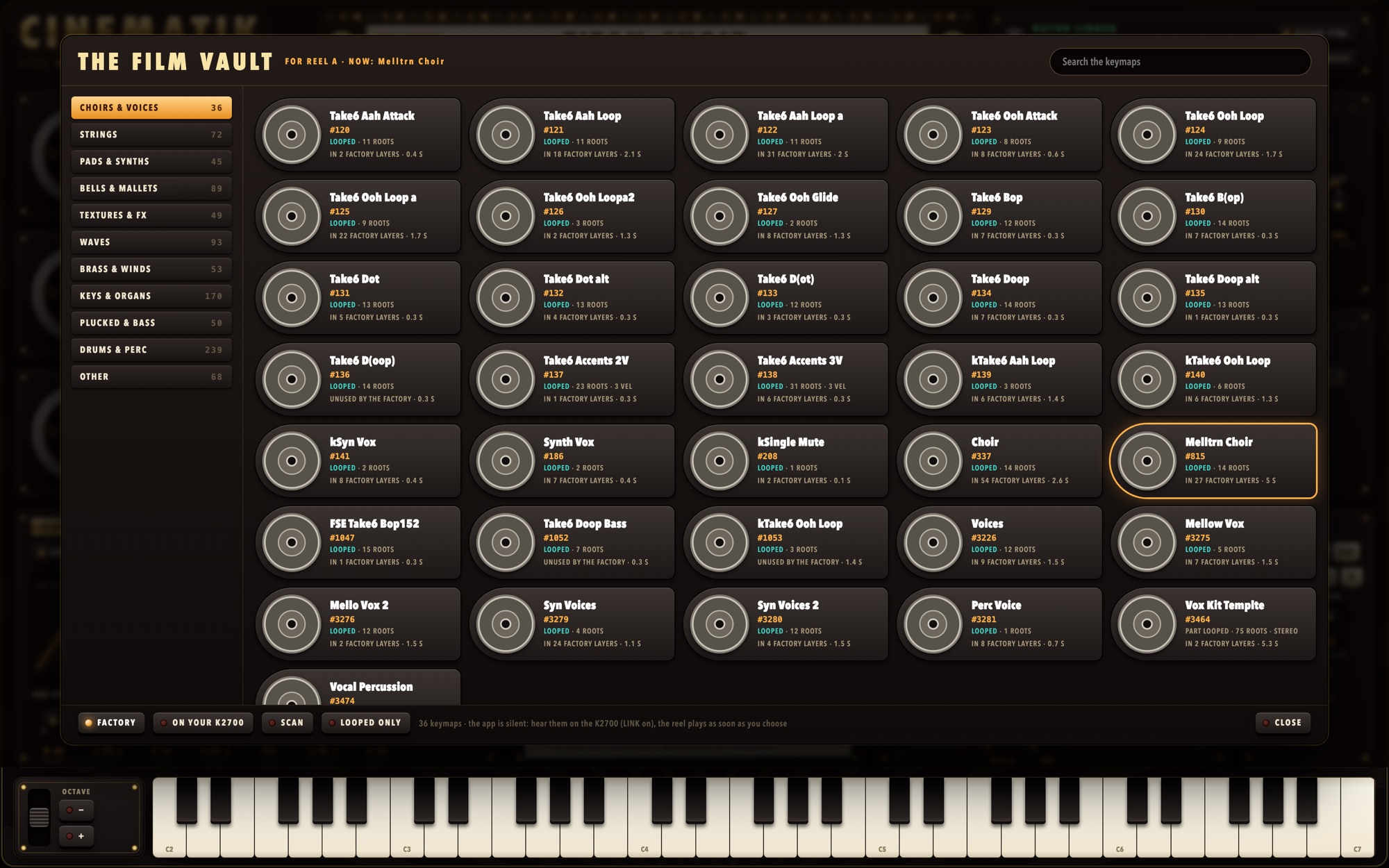
THE FILM VAULT opens from a reel's film can and puts a keymap on that reel. Every keymap is a film can with its name, its ID on the K2700 and what it is: LOOPED, PART LOOPED or ONE-SHOT, its roots, its velocity layers, stereo or not, how many factory layers use it and the length of its longest sample.
- FACTORY shows the K2700's factory keymaps on eleven shelves: CHOIRS & VOICES, STRINGS, PADS & SYNTHS, BELLS & MALLETS, TEXTURES & FX, WAVES, BRASS & WINDS, KEYS & ORGANS, PLUCKED & BASS, DRUMS & PERC and OTHER.
- LOOPED ONLY hides the one-shots.
- The search field looks through every shelf by name or ID.
- ON YOUR K2700 lists your own USER keymaps. SCAN asks the K2700 for each USER ID (4096 … 8191), with the LINK on; it runs while you keep playing, and SCAN again stops it. The list is kept for the next time.
A click puts the keymap on the reel and you hear it at once on the K2700; the vault stays open so you can try another. A reel that was at 0 in THE PIT comes up so you can hear it. Esc or CLOSE closes the vault.
A patch keeps the keymap's ID. A patch with one of your USER keymaps plays on a K2700 that holds that keymap at the same ID.
The screen
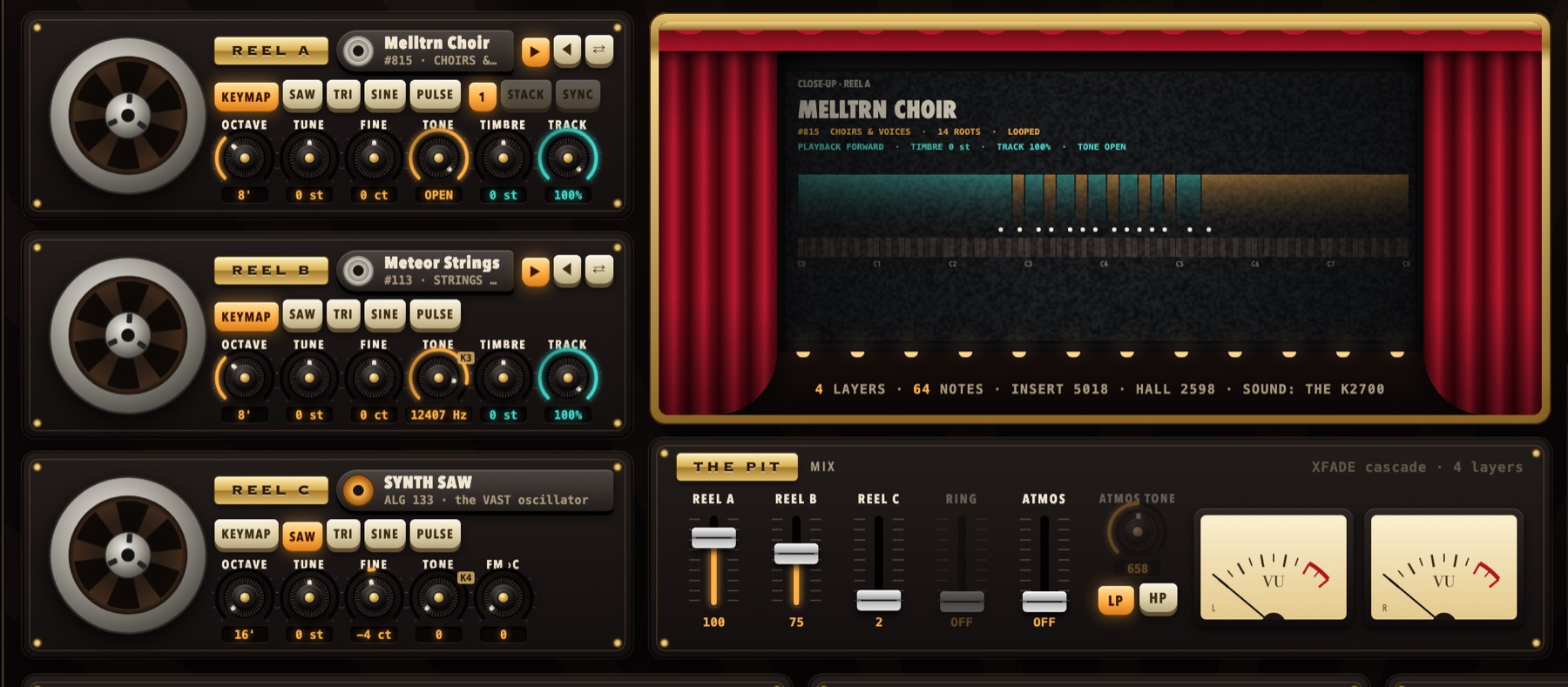
Between the curtains, the screen shows the title card: the pack that presents it, the patch's title, its synopsis, its category and genre, and what the reels play. It brightens as you play.
Touch a part of the panel and the screen projects a close-up of it: a reel's keymap with its zones and roots over the keys (the keys you hold light up) or its wave, the lens's curve, the envelope in timecode, the LFO, the mix, the effects, or the program's VAST layers as credits. After five seconds without a touch it returns to the title card. Under the screen: the layers a note takes, how many notes the K2700 can play at once, and the effects.
Without the LINK, the screen says so: CINEMATIK plays through the K2700.
The pit
| Control | Range | What it does |
|---|---|---|
| REEL A, REEL B, REEL C | 0 … 127 | Each reel's share of the mix. A reel at 0 is left out of the program. |
| RING | 0 … 127 | Reel A × reel B, a ring-modulation layer at the head of the chain. Both reels must be oscillators; it sets reel A to a single oscillator. |
| ATMOS | 0 … 127 | Noise into the mix: air, wind, hiss. |
| ATMOS TONE, LP / HP | 20 Hz … 20 kHz | A tone filter on the noise only. |
The two VU meters move with what you play.
The lens
The filter. Drag the lens up or down to move the cutoff (FOCUS): its ring turns and its iris opens as the filter opens. Double-click it to open it fully.
| Control | Range | What it does |
|---|---|---|
| TYPE | LP, BP, HP | Lowpass, bandpass, highpass. |
| SLOPE | 12, 24 dB | 12 dB: two poles, resonant, never self-oscillating. BP 12: FLARE sets the width. BP 24: a highpass and a lowpass at one frequency. |
| FOCUS | 16 Hz … about 20 kHz | The cutoff. |
| FLARE | 0 … 30 dB | The resonance; the lens glows with it. |
| ENV | −64 … +63 | MOD ENV 1 to the cutoff, 100 cents a step. The same value as a cue MOD ENV 1 → FOCUS: move one and the other follows. |
| LFO 1 | −64 … +63 | LFO 1 to the cutoff, the same way. |
| KEY | 0 … 100 % | How much the cutoff follows the keys. |
Motion
Three LFOs, chosen with the buttons on top. LFO 1 and LFO 2 run for each note; LFO 3 · GLOBAL is one LFO for all the notes at once, so a whole chord breathes together. The shutter turns at the LFO's rate.
| Control | Range | What it does |
|---|---|---|
| WAVE | SIN, TRI, SAW, SQR, S/H (LFO 1, 2: also RAMP↑, RAMP↓) | The shape. S/H is a random step. |
| RATE (the tabs) | Hz, 1/4, 1/8, 1/8T, 1/16 | Free in Hz, or locked to the K2700's tempo. |
| START | 0°, 90°, 180°, 270° | Where the wave starts on each note. |
| RATE (the knob) | 0 … 24 Hz | |
| FADE IN | 0 … 10 s | The LFO fades in after the note starts. |
| SLEW | 0 … 127 | Smooths the wave's edges (a slewed S/H wanders). |
Globals. A cue that uses LFO 3 switches the program's Globals on. Then LFO 2 runs on the K2700 as a repeating envelope: TRI and the two ramps only, in Hz, without START, FADE IN or SLEW. The CUE SHEET's last line says whether Globals are on.
The timeline
Three envelopes, chosen with the buttons on top: AMP (the volume), MOD 1 and MOD 2 (free for the cue sheet; MOD 1 also drives the lens's ENV). The film strip draws the envelope in timecode (minutes:seconds:frames, 24 frames a second), with the key's release marked KEY UP; TOTAL gives the time to the sustain and the release.
| Control | Range | What it does |
|---|---|---|
| PRE-ROLL | 0 … 60 s | The delay before the envelope starts. |
| FADE IN | 0 … 60 s | The attack. |
| HOLD | 0 … 60 s | Time held at the top. |
| DISSOLVE | 0 … 60 s | The decay to the sustain level. |
| SUSTAIN | 0 … 100 % | The level held while the key is down. |
| FADE OUT | 0 … 60 s | The release. |
| VELOCITY | AMP: 0 … 48 dB; MOD: 0 … 100 % | How much velocity scales the envelope. |
| LOOP | on / off | The envelope plays again from its attack while the key is held: a pulse, a slow tide. It needs a DISSOLVE. |
On the K2700 an AMP envelope's DISSOLVE and FADE OUT are the time to silence: give a long, ringing sound a long one.
The cue sheet
Sixteen cues, each SOURCE × VIA → AMOUNT → TARGET, typed on paper. VIA is optional: it scales the source (LFO 1 × MOD WHEEL is a vibrato on the wheel). Click a word to choose it. Drag the AMOUNT sideways (Shift for fine steps, double-click for 0); it runs −64 … +63.
| Sources | Targets |
|---|---|
| LFO 1, LFO 2, LFO 3, AMP ENV, MOD ENV 1, MOD ENV 2, VELOCITY, KEYBOARD, MOD WHEEL, AFTERTOUCH, PITCH BEND, EXPRESSION, FOOT, BREATH, RIBBON, SUSTAIN, RANDOM | A / B / C PITCH, ALL PITCH, A / B / C TONE, A DETUNE, A SYNC, B FM, C FM, B LEVEL, C LEVEL, ATMOS LEVEL, RING LEVEL, FOCUS, FLARE, AMP LEVEL |
| Target | One step of AMOUNT |
|---|---|
| PITCH | grows with the amount: 10 is 40 cents, 20 is 160 cents, 30 is 3.6 semitones, 63 about 16 semitones |
| FOCUS, TONE (a keymap's) | 100 cents |
| B LEVEL, C LEVEL, ATMOS LEVEL, RING LEVEL | 1 % of that source's share of the mix |
| FLARE, AMP LEVEL | 0.5 dB |
Hover a cue to see where it lands on the K2700. A cue struck through in red found no free place on the K2700 for it (every modulation slot of that layer is taken, or the target is not in this patch): change it, or free another cue. The last line counts the cues, the function generators in use and whether Globals are on.
The LFOs' rates and the AMP envelope's times are not targets: on the K2700 their controls are Knob 1, Knob 5 and Sliders 3, 6 and 4 (see The K2700's sliders and knobs).
Post
On the K2700 every patch uses one effect chain in its insert, GRIT → MOD → ECHO, plus a hall on an aux send. Every knob moves live. A lamp on each unit is lit when it is in use.
| Unit | Controls | What it does |
|---|---|---|
| GRIT | WET 0 … 100 % | Distortion before the modulation. |
| MOD | CHO, FLA or PHA; RATE; DEPTH 0 … 20 cents; MIX −96 … 0 dB | Chorus, flanger or phaser, one at a time. MIX is its level next to the dry sound (OFF at −96 dB). |
| ECHO | 1/4, 1/8, 1/8., 1/16; FDBK 0 … 90 %; LEVEL −96 … 0 dB | A tempo delay; LEVEL next to the dry sound, on its own. |
| HALL | TIME 0.5 … 10 s; SEND 0 … 100 % | The reverb. |
The echo, and an LFO locked to the tempo, follow the K2700's tempo (its TEMPO page). The scenes were made at 120 BPM.
The cast
| Control | Range | What it does |
|---|---|---|
| POLY, MONO, LEG | MONO plays one note at a time; LEG (legato) also does not restart the envelopes between overlapping notes. | |
| EXTRAS | 1, 2, 4 | Unison: the whole chain played 2 or 4 times, detuned and spread. |
| GLIDE | OFF … 127 | Portamento. |
| BEND | ±0 … ±24 semitones | The pitch wheel's range. |
| DETUNE, SPREAD (EXTRAS) | 0 … 50 cents; 0 … 100 % | The copies' detune and stereo spread. |
Under the knobs: the layers a note takes and how many notes the K2700 can play at once. The K2700 has 256 layer voices, so a 4-layer patch plays 64 notes; with EXTRAS 2 it plays 32. Under 8 notes is shown in red.
The keys
- The five octaves at the bottom of the window play the K2700; drag across them for a glissando. − and + shift them by octaves.
- The Mac's keyboard plays too: A W S E D F T G Y H U J K are C4 to C5, white and black keys as on a piano, up to '; Z and X shift them by octaves.
- The bender on the left springs back, like a pitch wheel.
- The K2700's own keyboard, wheels and pedals play the patch as usual: it is in the K2700's edit buffer.
Patches and the library
Places
A patch has a place: a group (A, B), a bank (1 … 8) and a number (1 … 8), so A11 … B88. The scenes fill both groups: CINEMATIK PACK 1 is A11 … A88, CINEMATIK PACK 2 is B11 … B88. MY PATCHES holds 128 places of your own. ◀ ▶ on the marquee step through the library you are in.
Saving
MY PATCHES in the booth writes the patch there: choose a place and a title (12 characters). Editing a patch marks it EDITED until it is written. INIT starts from a plain saw through an open lens.
The programme
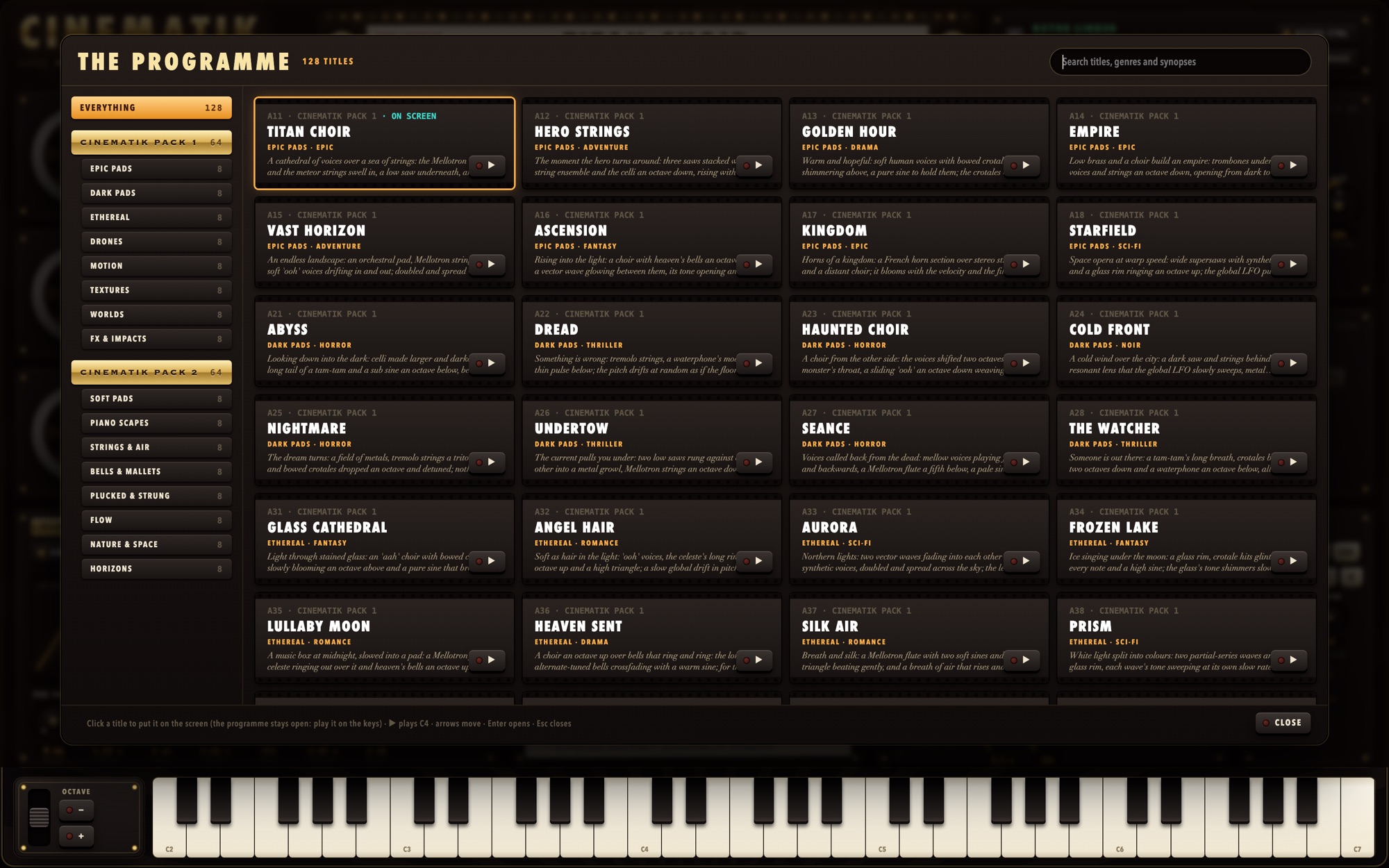
A click on the marquee's title opens THE PROGRAMME: every patch as a frame of film, with its place, title, pack, category, genre and synopsis. On the left: EVERYTHING, then each pack on a gold plaque with its own categories under it, and MY PATCHES; pick a pack or one of its categories. Search titles, genres and synopses. Click a frame to put the patch on the screen: the programme stays open so you can play it; ▶ plays a C. Keys: arrows to move, Enter to open and close, Space to play, Esc to close.
Managing your patches
MANAGE renames or deletes the patch at the current place, exports all your patches as one bank file, and
imports a bank or patch file placed in the app's import folder (~/Documents/CINEMATIK/import; exports go
to ~/Documents/CINEMATIK/exports). It asks before replacing a patch of yours.
Working with the K2700
The LINK
With the LINK on, the patch plays in the K2700's edit buffer on the LINK's channel and every change is sent as you make it. Nothing is stored on the K2700 until you press STORE. Flip the switch again to disconnect.
The effect chain. The first time, CINEMATIK may find that the K2700 does not have its effect chain and ask to write it (only the chain; no program is changed). Say WRITE: without it the K2700 plays your sounds without GRIT, MOD and ECHO.
Storing and reading
STORE writes the patch as a program into a USER place (4096 … 8191), named "NCO" and the patch's title, with the effect chain it uses. It asks before replacing anything and reads the program back to check it. READ opens a stored program (any ID 1 … 8191) as a patch. A program that was changed on the K2700 in ways the app does not write opens as the nearest patch, with a list of what it leaves out.
Good to know
- While the LINK plays a patch, the K2700's display keeps the name of the program selected on it; STORE gives your sound its own name.
- The keymaps are the K2700's: a stored program plays on the K2700 alone, with no Mac connected.
- The VAST layers on the screen's credits are numbered as the K2700 numbers them, to find a layer in the K2700's own editor.
The K2700's sliders and knobs
Each program carries a control plan, so the K2700's own panel plays it. K2700 CTRL shows these tags on the app's knobs.
| K2700 | Moves | K2700 | Moves |
|---|---|---|---|
| Slider 1 | FOCUS (the cutoff) | Knob 1 | LFO 1 RATE |
| Slider 2 | FLARE (the resonance) | Knob 2 | Reel A's DETUNE (STACK) |
| Slider 3 | AMP FADE IN | Knob 3 | Reel B's TONE |
| Slider 4 | AMP FADE OUT | Knob 4 | Reel C's TONE |
| Slider 5 | The lens's ENV | Knob 5 | LFO 3 RATE |
| Slider 6 | AMP DISSOLVE | Knob 6 | REEL B's level |
| Slider 7 | ATMOS | Knob 7 | REEL C's level |
| Slider 8 | GRIT WET | Knob 9 | HALL TIME |
| Slider 9 | HALL SEND | Button 9 | The hall on / off |
Most scenes also answer the mod wheel (a vibrato, more of a reel, a brighter lens) and the K2700's pressure (a brighter lens or a swell): play them from the K2700's keyboard.
The scenes
128 patches in two packs, one category per bank, each with a genre and a synopsis, every one levelled on the K2700 to the same loudness. A scene cannot be overwritten: write it into MY PATCHES to keep your changes.
CINEMATIK PACK 1 (group A)
Dark and vast: pads, drones and trailer moments.
| Bank | Category | Bank | Category |
|---|---|---|---|
| A1 | EPIC PADS | A5 | MOTION |
| A2 | DARK PADS | A6 | TEXTURES |
| A3 | ETHEREAL | A7 | WORLDS |
| A4 | DRONES | A8 | FX & IMPACTS |
They layer the K2700's keymaps (Mellotron choirs, strings and flute, voices, bowed crotales, bells, gongs, a tam-tam, a waterphone, vector waves and more) with the synth's oscillators, and keep moving: slow LFOs cross-fade the reels and sweep their tone and the lens, LFO 3 makes every note breathe together, the MOTION scenes pulse at the tempo. The drones are made to be held on one low note, its fifth or octave added. All 64 can be heard on CINEMATIK's page and on CINEMATIK PACK 1's.
CINEMATIK PACK 2 (group B)
Calm and light: relaxing scenes that still move, most of them on the K2700's acoustic keymaps.
| Bank | Category | Bank | Category |
|---|---|---|---|
| B1 | SOFT PADS | B5 | PLUCKED & STRUNG |
| B2 | PIANO SCAPES | B6 | FLOW |
| B3 | STRINGS & AIR | B7 | NATURE & SPACE |
| B4 | BELLS & MALLETS | B8 | HORIZONS |
Piano and its soft layers, tine pianos, harp, nylon and steel guitars, koto, flutes, clarinet, oboe, horn, solo violin, viola and cello, celesta, vibes, marimba, glockenspiel, chimes and mbira, over soft pads with open lenses and almost no resonance. Struck and plucked notes are given a long, natural fall, often into a pad beneath them; the motion is small and slow. They suit broken chords and slow melodies more than held clusters: every one can be heard on CINEMATIK PACK 2's page.
Troubleshooting
| Symptom | Check |
|---|---|
| No sound at all | CINEMATIK plays through the K2700: the LINK must be on (the booth says K2700 LINKED) and the K2700 on the LINK's MIDI channel. |
| The LINK does not connect | The USB cable in the K2700's USB COMPUTER port; the K2700 on and in Program mode; the right port chosen. |
| The K2700 plays another sound | The K2700's selected MIDI channel must be the LINK's channel. |
| No GRIT, MOD or ECHO on the K2700 | Its effect chain is missing: connect the LINK again and say WRITE, or STORE the patch once. |
| A keymap dies away while the key is held | It is a one-shot (THE FILM VAULT says ONE-SHOT): use a looped keymap to carry a pad. |
| A keymap is quiet or silent on some keys | It is made for another range, or it is a kit with sounds on some keys only: move the reel's OCTAVE or TUNE, or play elsewhere. |
| A patch with a USER keymap is silent | That K2700 does not hold the keymap at the same ID: load it there, or choose another keymap. |
| SCAN finds nothing | The LINK must be on, and the K2700 must hold USER keymaps (IDs 4096 … 8191). |
| The echo or a tempo LFO runs at the wrong speed | They follow the K2700's tempo: set it on its TEMPO page (the scenes were made at 120 BPM). |
| The K2700's display shows another name | Normal while the LINK plays the edit buffer; STORE names the program. |
| A control is grey | Hover it: the reason is shown (for example, RING needs reels A and B to be oscillators). |
| A cue is struck through | No free K2700 slot for it on that layer, or its target is not in this patch: free another cue or change the target. |
| Few notes of polyphony | Each reel, ATMOS, RING and EXTRAS add layers: leave out what the sound does not need. |